Perpetual progress rate of 90%
Perpetual progress rate of 90%
Have you ever experienced a project-management situation where you have achieved a steady progress rate of almost 100%, but have not been able to proceed from there? In this column, we will explain why this happens and how you should prepare in advance to prevent it from happening, including how to use TimeTracker RX.
![[Column] Kentaro Goto (Workplace Improvement Promotion Office, Project Center, DENSO CREATE INC.)](/concept/column/images/02-04/img-intro-interviewee.jpg)
Why does the progress rate remain perpetually at 90%?
One of the indicators to visualize the progress of work using project management tools is the "progress rate". The progress rate is a numerical value ranging from 0% to 100% of the progress of the work, and it is very convenient for managers to quickly grasp the progress by checking the value. However, if you use the progress rate incorrectly, you will end up in a situation where you cannot properly grasp the actual situation.
Rate of progress according to the sense of the person in charge
The work done in the project is detailed as a WBS(Work Breakdown Structure) and assigned to the person in charge of each task at a reasonable granularity. In addition, the progress rate of each task will often be reported to the person assigned to that task.
So how does the person in charge look for progress rates? Isn't it possible that there are no clear rules and they are looking for them by feel?
If the person in charge is familiar with the work or has already done it several times over, you may still be able to operate it without any problems. However, if you don't, your progress rate will be shaken by the expansion of what you have to do for the following reasons, and you will not be able to reach 100%. ・ Since it is difficult to foresee the entire work from the beginning,
I noticed a lack of work along the way.
・There are more revisions than expected.

'I don't want to give a bad report' mentality
Since the rate of progress is determined by feel, the human psychology of not wanting the problem to surface if possible may have an impact.
If things are going according to plan, you are unlikely to be asked to report any further. However, if you are behind schedule, you will be asked to report the cause of the delay and future measures. As a result,Even if there is a slight delay in the work, if the person in charge thinks it is within his or her means of getting it back, it is easier to report that it is going as planned.If you are looking for a rate of progress by feel, you can report a little more at your own discretion.
However, in the end, you will not be able to catch up and will have trouble reporting when the end date of the task is approaching. A 100% progress rate means completion of the work, so if it is not finished, it cannot be reported as 100%. As a result, you end up with a situation where the progress rate stops at almost 100%.
Manager's illusion of being able to manage
In the previous example, the progress rate does not correctly represent the progress of the work and is an indicator that cannot be used to evaluate progress. So why would a manager allow such a situation to happen?
By quantifying the progress of the work as a percentage of progress, the managerI feel like I can manage it somehow.It's a thing. On the surface, when the progress rate numbers are going well, there is a danger that we will be relieved by that alone and overlook it without checking the real reality behind the progress rate.
In such cases, it is only when the progress rate does not progress as expected that we realize the difference between the progress rate and the actual situation.At that point, it's too late.It may be. If you don't know how the person in charge is looking for the progress rate, you can't say that you are managing it by only following the progress rate numbers.
Things to prepare in advance
Clarify the meaning of the progress rate figures
The progress rate is a numerical value of the progress of the work. On the flip side, you need to clarify the meaning of the numbers so that you can identify the progress of the work from the numbers. So, what should we pay attention to when assigning numbers and defining their meaning?
There are many different types of work (tasks) to be performed in a project. Some tasks are simple and repetitive, while others are unpredictable, such as planning and consideration. It is impossible to find these progress rates in the same way.Change the method of calculating the progress rate flexibly according to the characteristics of the taskIt is important to.
The progress rate has a denominator and a numerator, but if the denominator fluctuates, it becomes a meaningless indicator.The key is to choose a denominator that is difficult to change.If you have a clear estimate of the amount of output deliverables for simple repetitive work, you can calculate the percentage of progress.

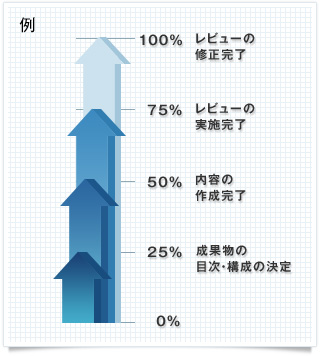
On the other hand, if it is difficult to calculate the progress rate, it is a good idea to define multiple states for the task and assign a numeric value to each. The granularity of state definition depends on the size of the task. For example,The key is to define the state with a granularity so that the progress rate changes every time you check the progress.It will be.
・Determined the table of contents and structure of the deliverables: 25%
・Content created: 50%
・Reviewed: 75%
・Review revision completed: 100%
In some cases, the task itself can be further subdivided to build up the percentage of progress. In this way, by determining the progress rate based on some kind of thinking and evidence, we can avoid the problem of "eternal 90%".
Sharing the meaning of numerical values with the team
Even if you make the meaning of the progress rate numbers clear, it is meaningless if they are not shared within the team.The progress rate becomes an indicator that can be used for management only when the person reporting and the person checking can visualize the same situation from the numerical values.It is important to share the meaning of the progress rate numbers within the team before the person in charge starts working.
How TimeTracker RX Defines Progress Rates
TimeTracker RX provides a framework for managing progress-rate on a per-task or package basis (i.e., a group of tasks).
"Automatically calculated from status" and "weighted average" that automatically calculate
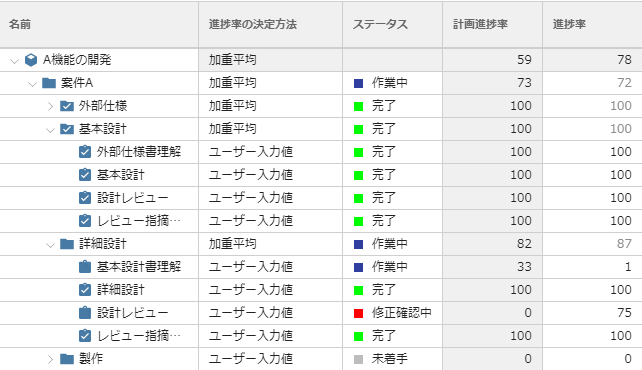
For WBS of "work items" defined in the task/package, the progress rate is calculated by combining "automatic calculation from statuses" and "weighted averages" as shown below.
・Task: Automatic Calculation from Status
In advance, the mapping between status and progress rate is defined as "in progress": 50%, "handled issues: 70%, "completed": 100%, and the progress rate is View according to the status entered by the person in charge.
・Package: "weighted average"
The average value of the progress rate is automatically calculated by weighing the subordinate items by scale (effort). If your WBS is detailed enough, you can get a reasonably accurate rate of progress with the default settings.
Scale progress rate, which defines the method for determining the progress rate
As mentioned earlier, depending on the nature of the task, you may want to rethink how you determine the percentage of progress.
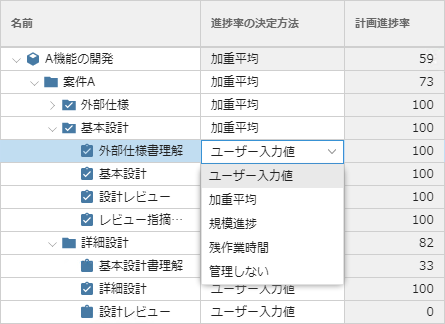
The method of determining the progress rate can be changed individually for each task or task package.
For example, if the amount of deliverables can be accurately estimated, you can select "Scale Progress Rate," which calculates the progress rate based on the degree of completion of the deliverables.
Thus, in order to calculate the progress rate in a meaningful way, it is important to set up an appropriate method for determining the progress rate in advance. In TimeTracker RX,Select the method of calculating the progress rate according to various casesThis allows for more accurate project management.