


Improvement activities at DENSO CREATE
DENSO CREATE has been engaged in improvement activities in the projects of software development for many years. Here are some of our results.
Improvement activities and updating tools with their results
The results of improvement activities at actual projects are reflected in developing tools at any time. The character of "tools for actual use" is becoming stronger with each version upgrade.
Time management
As basic data for improvement,
accurate man-hours are collected
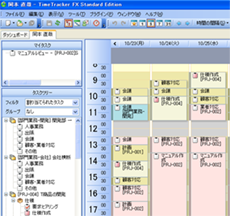
When improvement activities to improve quality and productivity at DENSO CREATE's software development projects began, the first step was to gather accurate man-hour data to understand the current situation. However, we experienced that it was not possible to calculate man-hours accurately and timely by having workers report their work hours using spreadsheets or tools that were not easy to use. Therefore, we revised our in-house tool and developed a time management system TimeTracker that is more user-friendly.
Project Management
Improvement of planning and progress management +
promoting improvement by analyzing man-hours
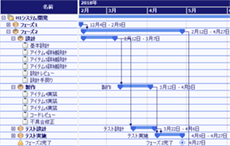
Early project-management functions of TimeTracker detailed planning from the start, which did not fit with the actual approach of progressively refining a rough plan. Therefore, we focused on how to make actual plans and devised a system (FX-WBS:Flexible WBS) that allows flexible planning, both rough and detailed. We have developed a TimeTracker FX that incorporates features of Excel (e.g., usability and calculating estimates) that were actually often used when planning, as well as a mechanism that makes it easier to tabulate and analyze data using man-hours.
Excel linkage
Firmly established the use of tools and quantitatively progress report
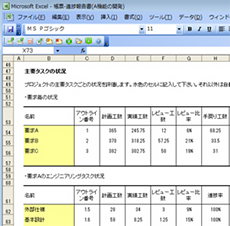
TimeTracker FX was becoming an in-house standard project management tool that covers everything from estimates to scheduling and progress management. On the other hand, reports are actually often created in Excel. Looking at the forms, they were well devised. We found that progress-reporting in Excel is still essential for actual projects. The process of transcribing TimeTracker FX into Excel reports is time-consuming, and in some cases, people stopped using TimeTracker FX. Therefore, we changed our policy to "make the most of each other's strengths by allowing TimeTracker FX to link easily with Excel," and developed a new feature called "Excel Linkage Add-in". Excel reports and TimeTracker FX can now be synchronized easily.
Visualization
Visualization of man-hours and promotion of on-site-led improvements
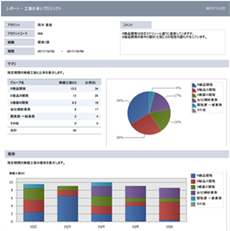
Analyzing and visualizing work hours is a time-consuming task, such as outputting it to Excel and processing it manually. In some cases, data was collected, but analysis and improvement activities were not achieved. In addition, even if the department promoting improvement or the person in charge prepares a report, it is given to them and does not lead to the promotion of voluntary improvement activities at the site. Therefore, in order to make it easier for anyone to start visualization and improvement activities by man-hours, we have installed a "Quick Report" function based on the concept of "visualization immediately and without hassle when you think about it. As a result, there is no need to export the data to a Excel or other source, which greatly reduces the burden of reviewing personal man-hours, analyzing the man-hours ratio for each process, and creating reports.
Plans from visualizing to "showing"
With a natural awareness of planning,
Establish new work styles
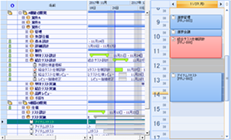
By making operations more visible, on-site improvement activities have become more active. However, in order to check the schedule, it was necessary to open the project management screen, and because of this hassle, many members did not look at the plan often, and their awareness of the plan was weak. In addition, this led to a decrease in the accuracy of the plan and a widening deviation from the plan. Therefore, with the concept of "everyone can Input work time with an awareness of planning. With the concept of "making planning closer and easier," we have installed a function to View your own Gantt Chart on your personal Input work time page. We have made the planning "visible" in the daily Input work time scenes. The goal was for anyone to be able to work with a natural awareness of planning. If all members, not just managers and leaders, start checking the plan, the frequency and accuracy of plan updates will naturally improve.
Support for retention
Promoting the establishment of Input work time in the workplace
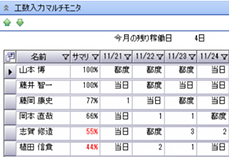
In the early stages of the introduction of Time Management tools, you will always have trouble with Input work time retention, such as "there is no culture of Input work time and it does not penetrate everyone" or "entry does not continue. Another issue is the low accuracy of the collected data. For example, let's say you enter all Actual time for a day in one week. After a week, you have forgotten the content and the time it took, so you have to remember what you are typing. Such summarization reduces the accuracy of the input data and does not result in correct data that can be used for improvement. In order to promote improvement activities based on man-hours, it is necessary to gradually eliminate the "summarization of man-hours" and foster a culture in which the man-hours of the day are input on the same day.
The retention monitor is a system installed to support the development of a high-precision Input work time culture based on the concept of "anyone can enter man-hours every day, and Input work time will take root. The system visualizes Input work time status of employees, which naturally prevents them from forgetting to Input work time on a daily basis and promotes timely Input work time.
Collaboration
Accelerate on-site operations through Web and real-time sharing
The need for Web applications has only increased as the world shifts to Web applications and cloud computing. Furthermore, in order to cope with the rapidly changing situation, the need to improve the speed of operations continues to increase day by day.
In order to provide more powerful support for improving operations in the field under these circumstances, the newest version of TimeTracker NX was created. Because it is a Web application, you can start using it right away without the hassles of installing it on every PC.
Due to the nature of Web application, changes are shared immediately. The contents of the members' reports are also shared in real time. We have realized a collaboration system that responds to the demands of the times.
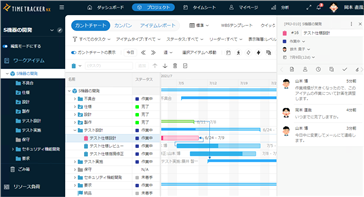
In addition, Input work time and projectediting, which used to be completely separated from each other, can be done seamlessly without switching screens. You can now add and updatetasks on Input work time page, or enter man-hours directlyon the projectmanagement page, without stress. You will be able to focus on more essential activities, which will lead to improved results.
TimeTracker RX
~Toward an integrated management system that anticipates the future, guided by data
Changes in working styles and the business environment are making projects more complex, and the members and organizations involved continue to expand. Rather than simply managing individual projects, we are now required to make swift decisions and make improvements based on decision-making as a company or organization.
TimeTracker NX, which has been specialized in individual project-management until now, has evolved to become a "TimeTracker RX" that can centrally manage personnel, profits/costs, quality/risk. Using the exact fact of man-hours as a starting point, you can view the status of a project from a single perspective and connect it to management across organizations and multiple projects.
TimeTracker RX not only visualizes progress and man-hours, but also assists in making appropriate decisions by accurately understanding the essential elements of project-operation and the status of the entire organization. In addition, we will use AI to improve projectmanagement.
Presentations at external conferences on improvement activities
The results of improvement activities at development site of DENSO CREATE are presented and evaluated at conferences and symposiums.