I want input work time to take root
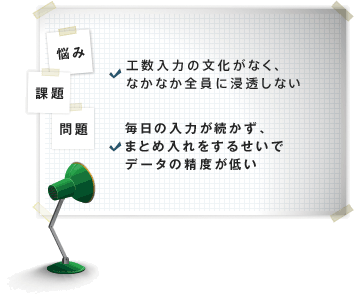
When a time management
tool is first introduced, organizations
may struggle with the
absence of a time-entry culture or inconsistent participation. Effective improvement also requires a habit
of entering each day's work time on that day. TimeTracker visualizes adoption and helps
everyone maintain daily time entry.
Measures to establish input work time
-
Visualization of the status of input work time establishment
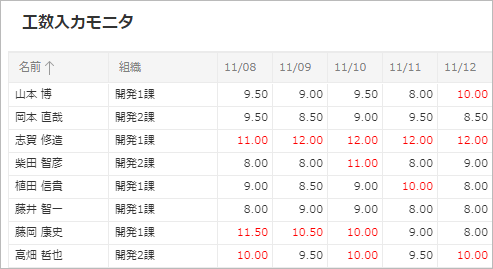
Time entry monitor visualizes the daily Input work time of organizations and project members, helping to ensure that Time Management from TimeTracker penetrates the organization.
The entry status of the member can be identified at a glance and the input status can be checked at any time.This allows you to follow up as soon as possible, prevent forgetting to Input work time and promote timely entry. -
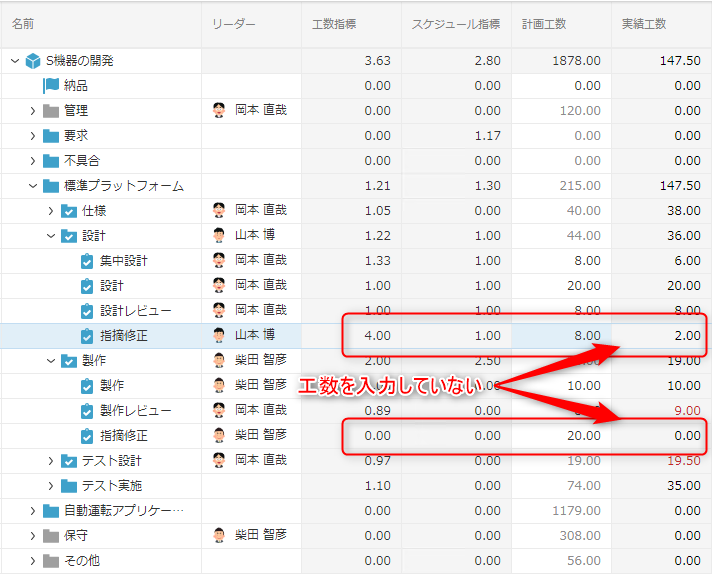
Error in inputting man-hours detected from TPI
When work time is entered against the wrong task, the error
can be difficult for others to notice and reduces data accuracy. TimeTracker uses TPI* to quantify work-time consumption for each task. Incorrect entries cause the TPI value to deteriorate, so reviewing it regularly in project
meetings helps detect errors. *Time Performance Index: an indicator of work-time consumption.