I want to adjust the workload

Balancing the workloads of people assigned to multiple
projects or across an organization can be difficult.
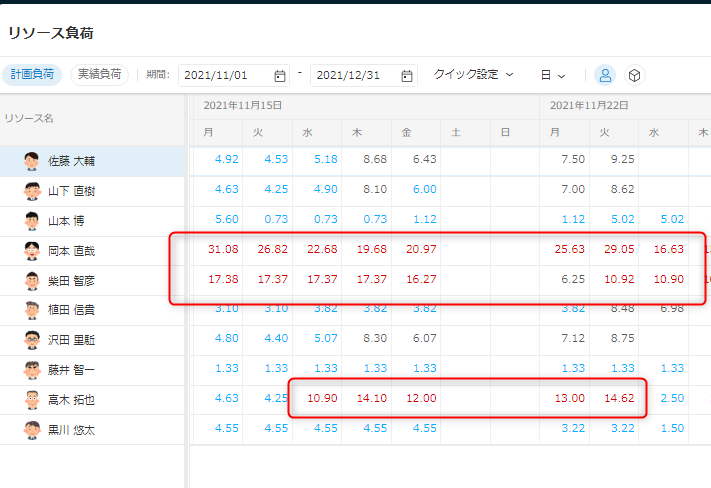
Consolidating the data in Excel takes time, while subjective decisions make strategic staffing harder. TimeTracker provides a cross-project view of each member's current load and
upcoming workload, enabling appropriate adjustments at an early stage.
Real-time load visualization and adjustment
-
Load adjustment at the time of project planning
Even after planning work time and schedules and
assigning members, determining whether workloads are reasonable can be difficult. When planning a project, TimeTracker lets you immediately compare each member's planned and actual
work time so you can create a realistic plan. -
Consideration of the status of investment in other projects
A member assigned to your project may
already have work scheduled on another project during
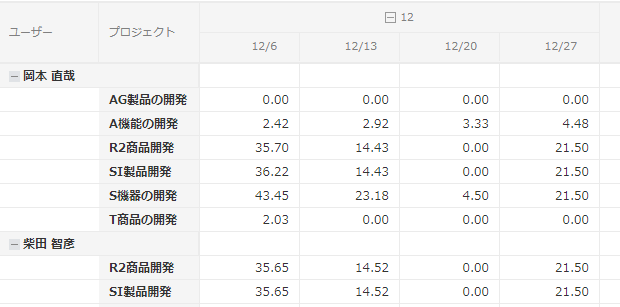
the same period. TimeTracker shows how each member's work time is allocated to other projects, helping project teams coordinate workloads with one another. -
Find busy members quickly
As organizations and projects grow, it
becomes difficult to keep track of everyone who is overloaded. TimeTracker quickly identifies busy members and the projects driving their
workload, helping managers distribute work more evenly.